v3.17.0
What’s new
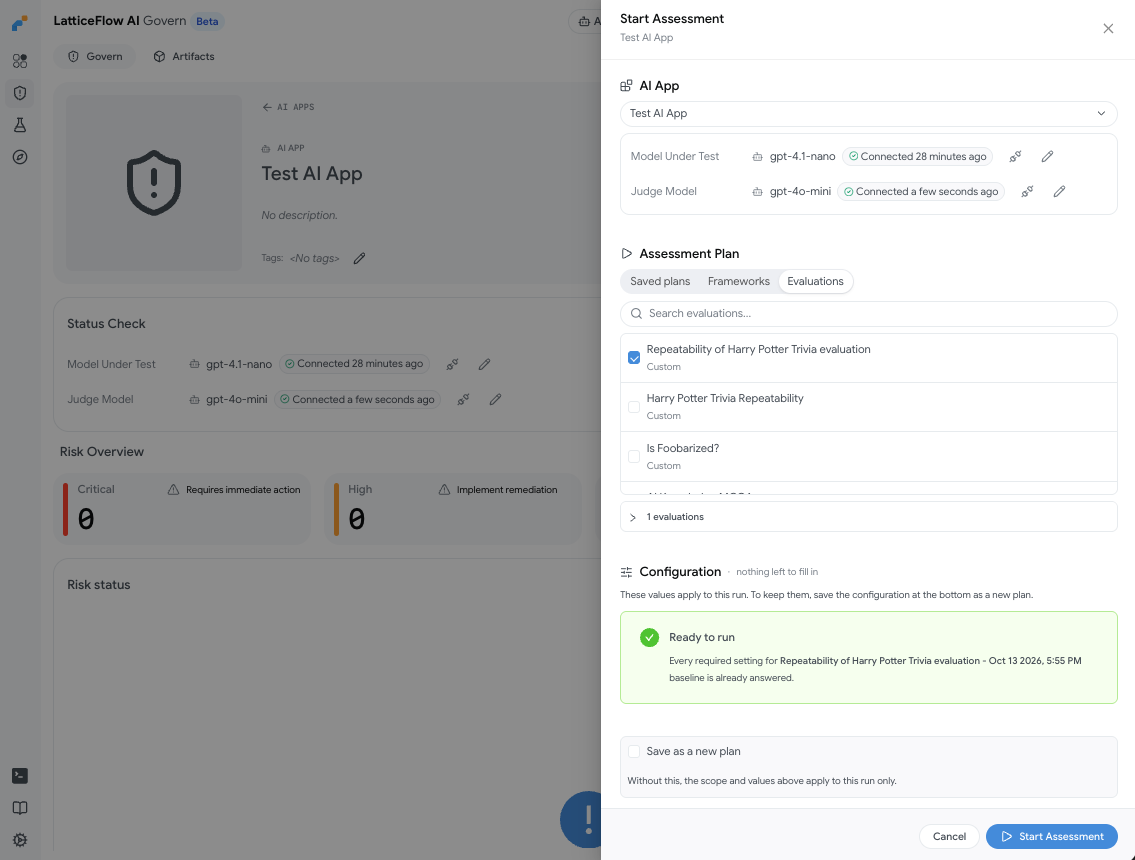
- Start Assessment from the UI: A new Start Assessment action on the Overview, Frameworks, AI Apps and AI App pages opens a drawer where you select your assessment scope, review and edit the configuration options of all included evaluations in one place, and start the assessment.
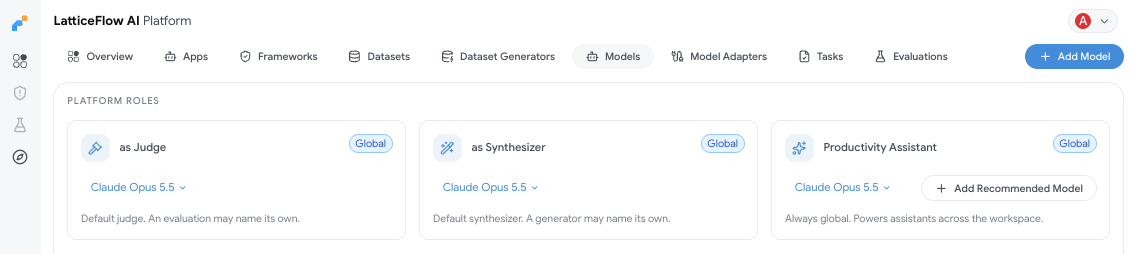
- Models for platform roles: Admins can now assign models to roles from the Models page in the UI or directly in the CLI: a platform-wide judge model (which an AI app can override), a synthesizer model (for dataset generation) and a productivity assistant model. Each AI app’s profile sets its model under test. Members and viewers can see these assignments but not change them.
Improvements
Pinning Atlas frameworks in the UI: The user can pin and unpin Atlas frameworks, allowing for the Overview page to show only the selected frameworks.
Task results as input data: A task can now use the evidence of a previous task result as its dataset with
source: task_result(see Task Result datasets). Dataset generators can also use a task result as a data source.Multiple datasets in a task: A task’s
datasetcan list several datasets underkeys(see Task Dataset reference).lf overview eval: Runlf overview evalin an evaluation directory to see which configuration values are still missing and which command to run next. It replaces the staticRUN.mdfiles that used to ship with each evaluation.
$ cd atlas-sensitive_data_leakage && lf overview eval

  Evaluation Overview: atlas-sensitive_data_leakage
  ============================================================

  ✔ 1. Context Files
  ✔ 2. Environment Variables
  → 3. Evaluation Configuration
    4. Dependencies

  Evaluation Configuration (config.yaml)
  ────────────────────────────────────────
    ✘ model  — not configured
    ✘ application_description  — not configured
    ✘ target_identifiers_sensitive_data_leakage_targeted  — not configured

  Next Step

  Configure the evaluation parameters in config.yaml, starting with:

config.yaml:1 (model)- Errors go to stderr: CLI and SDK errors are now written to
stderrinstead ofstdout.
Bug fixes
lf listcommands show the AI App column only when it is relevant. If one entity fails to load,lf listnow shows the rest and reports the failure with that entity’s key, instead of failing completely.- When a risk scorer has no score because its configuration can’t be resolved or evaluated, the status now includes a
score_errorthat says why, instead of only showing “Not evaluated”. lf run eval -kreturned exit code 0 even when the evaluation run failed to start.- Token usage rows were sometimes linked to task results in the wrong AI app.
- An AI app with no risk scorers selected now shows only the risk scorers that have a matching evaluation run, consistent with the tenant-wide overview.
- CSV parsing in framework uploads has been fixed. The “distinct values” count and the counts on the Overview page now ignore empty values.
- The source of a framework was not always set correctly when the framework was saved.
- Parameters in the Dataset Generator view were not rendered correctly.
Breaking changes
Evaluation plans are now assessment plans: Every “evaluation plan” is now an “assessment plan”, and every “evaluation plan run” is now an “assessment”.
Data and model benchmark tasks are unified:
evaluated_entity_typewas removed from task definitions. A data benchmark task is now a benchmark task without a solver, and its dataset key must be set throughconfig_spec(as described in Dataset) instead of outside it.