Token Usage Tracking
Why Token Usage Matters
Every call to a language model or agent consumes tokens - the units of text the model reads (input tokens) and generates (output tokens). LF AI Platform tracks token usage per inference call so you can attribute the cost of running evaluations and generating datasets to specific models and runs.
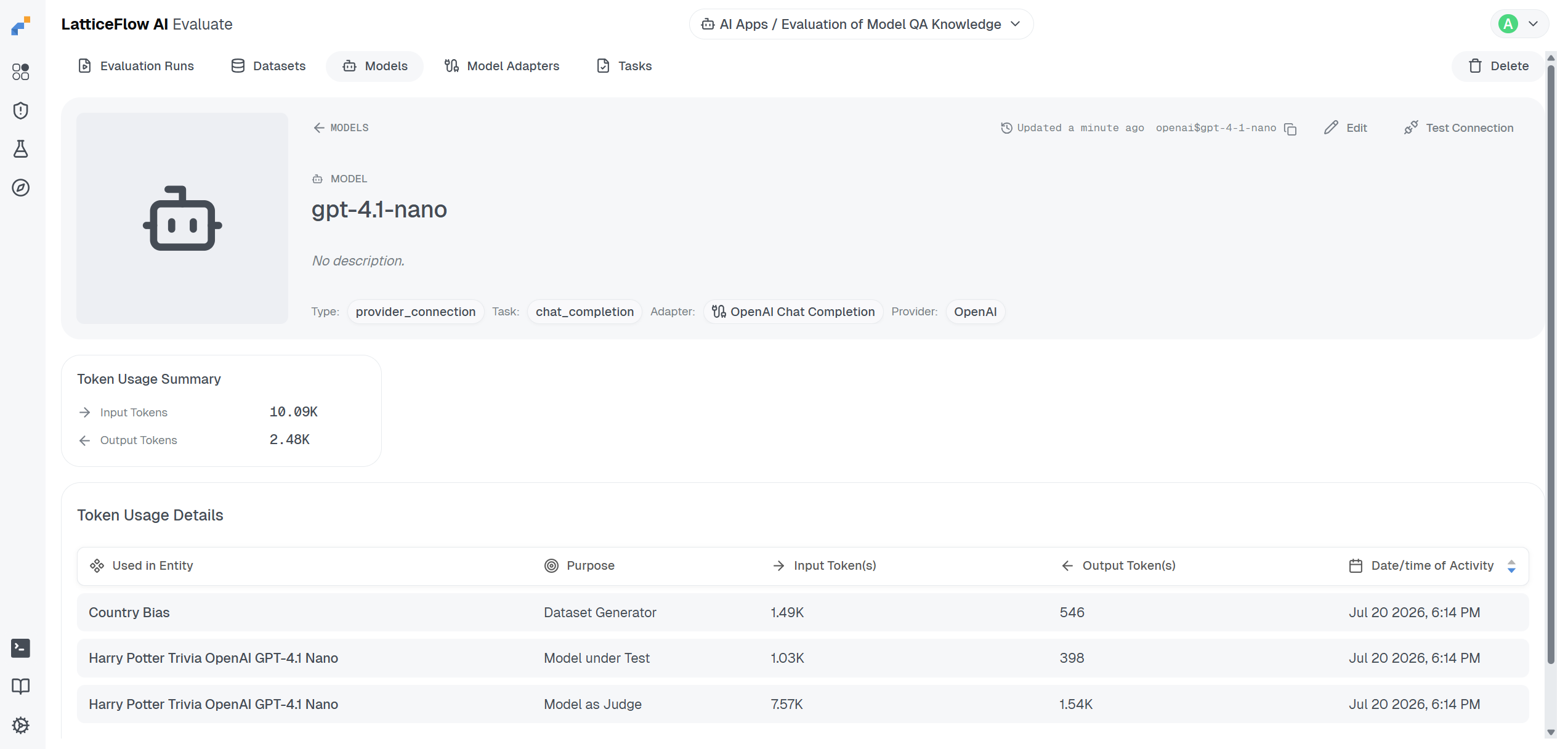
Each entry of the breakdown is attributed to one of three purposes: test (a one-off lf test model call), judge (a model acting as a judge inside a task) and generate (a model driving a dataset generator).
How LF AI Platform Tracks Usage
LF AI Platform reads token usage directly from the model output. Every structured model output type - chat completion, RAG completion, embeddings and Open Responses - supports an optional usage field (ModelUsage); once you populate it, LF AI Platform records it automatically with no additional configuration. Models with the custom ML task have no output schema and therefore no place to report usage.
LF AI Platform does not read token counts from the provider’s raw response directly, because each provider uses a different response shape. You are responsible for mapping the provider’s token fields to LF AI Platform’s schema in your adapter or inference snippet.
How to Report Usage
How you populate usage depends on how your model is integrated: via an output adapter, a custom inference snippet with the identity adapter, or an agent inference snippet returning an Open Responses trace.
Output Adapter
If your model uses a model adapter, add a usage block to the output Jinja template. The template has access to the provider’s raw response - map the provider’s token fields to num_prompt_tokens and num_completion_tokens. This applies whether the adapter is used alone or alongside a custom inference snippet.
The following example targets an OpenAI-compatible provider. Field names vary by provider - inspect the raw response to find the correct keys for yours:
model_adapters/openai_chat_completion_output.jinja
{% if response.usage is defined and response.usage is not none %}
    ,"usage": {
        "num_prompt_tokens": {{ response.usage.prompt_tokens }},
        "num_completion_tokens": {{ response.usage.completion_tokens }}
    }
{% endif %}
Custom Inference Snippet with the Identity Adapter
If your model uses a custom inference snippet with the identity adapter (latticeflow$identity), the snippet’s return value becomes the model output essentially unchanged - the identity template only turns a non-200 status code into an error object. Populate usage directly in the returned object.
The following example uses ChatCompletionModelOutput - replace the token counts with values extracted from the provider’s response:
run_inference.py
from typing import Any
from latticeflow.core.dtypes import ChatCompletionModelOutput, ModelUsage

def run_inference(body: str, environment: dict[str, Any]) -> str:
    output = ChatCompletionModelOutput(
        choices=[...],
        usage=ModelUsage(num_prompt_tokens=42, num_completion_tokens=17),
    )
    return output.model_dump_json()
Agents and Custom AI Systems (Open Responses)
For agents and custom AI systems that return an OpenResponsesModelOutput trace, pass usage alongside items when constructing the output object. Extract the token counts from the provider’s response before building ModelUsage - for example from a message_end event in a streaming response.
The following example uses OpenResponsesModelOutput - replace the token counts with values extracted from the provider’s response:
run_inference.py
from typing import Any
from latticeflow.core.dtypes import ModelUsage, OpenResponsesModelOutput

def run_inference(body: str, environment: dict[str, Any]) -> str:
    output = OpenResponsesModelOutput(
        items=[...],
        usage=ModelUsage(num_prompt_tokens=42, num_completion_tokens=17),
    )
    return output.model_dump_json()
Validate Integration
After adding usage, verify it is reported correctly before running evaluations. Run lf test model with your model’s key - in the output, look for the usage field under Model output in the format expected by LatticeFlow AI:
lf test model openai-gpt-4-1-nano4. Transforming model output.
...
Model output in the format expected by LatticeFlow AI:
output='{"choices":[...],"usage":{"num_completion_tokens":9,"num_prompt_tokens":9}}'
==============================================================
Successfully tested configuration of model with key 'openai-gpt-4-1-nano'.Alternatively, open the model’s detail page and click Test Connection. Click Run, then open the Transform Output stage and check the Model Output section - usage should appear with non-zero num_prompt_tokens and num_completion_tokens.
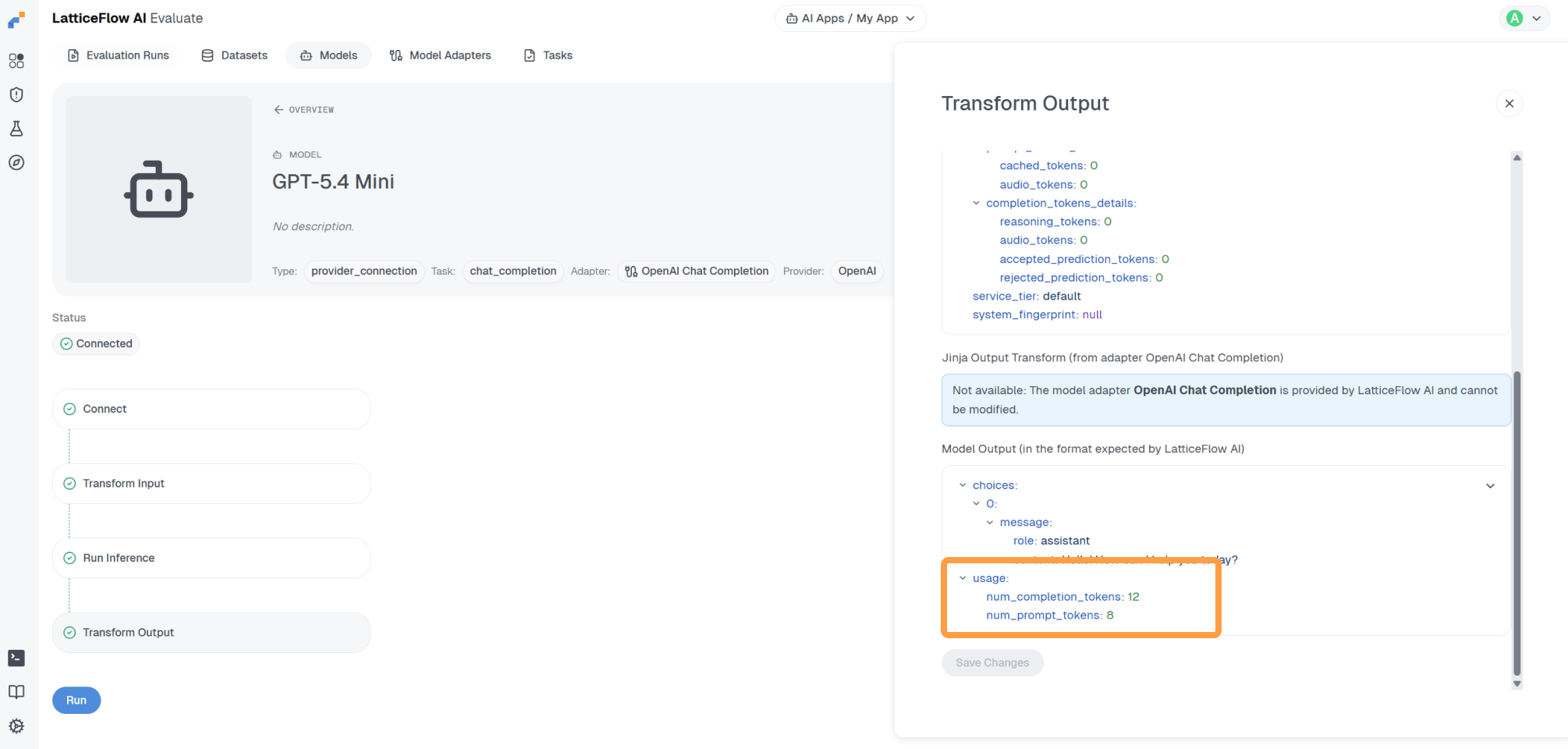
If usage is absent, verify that the provider’s raw response includes token counts - if it does not, token tracking is not supported by that provider endpoint. If it does, check that your integration code is correctly mapping to the field names expected by LF AI Platform.